Pathly


Context
User-Centered Design
Accessibility
Service Design
Methods
Problem Framing
Secondary Research
Journey mapping
Prototyping
Role
Product Design
UX Research
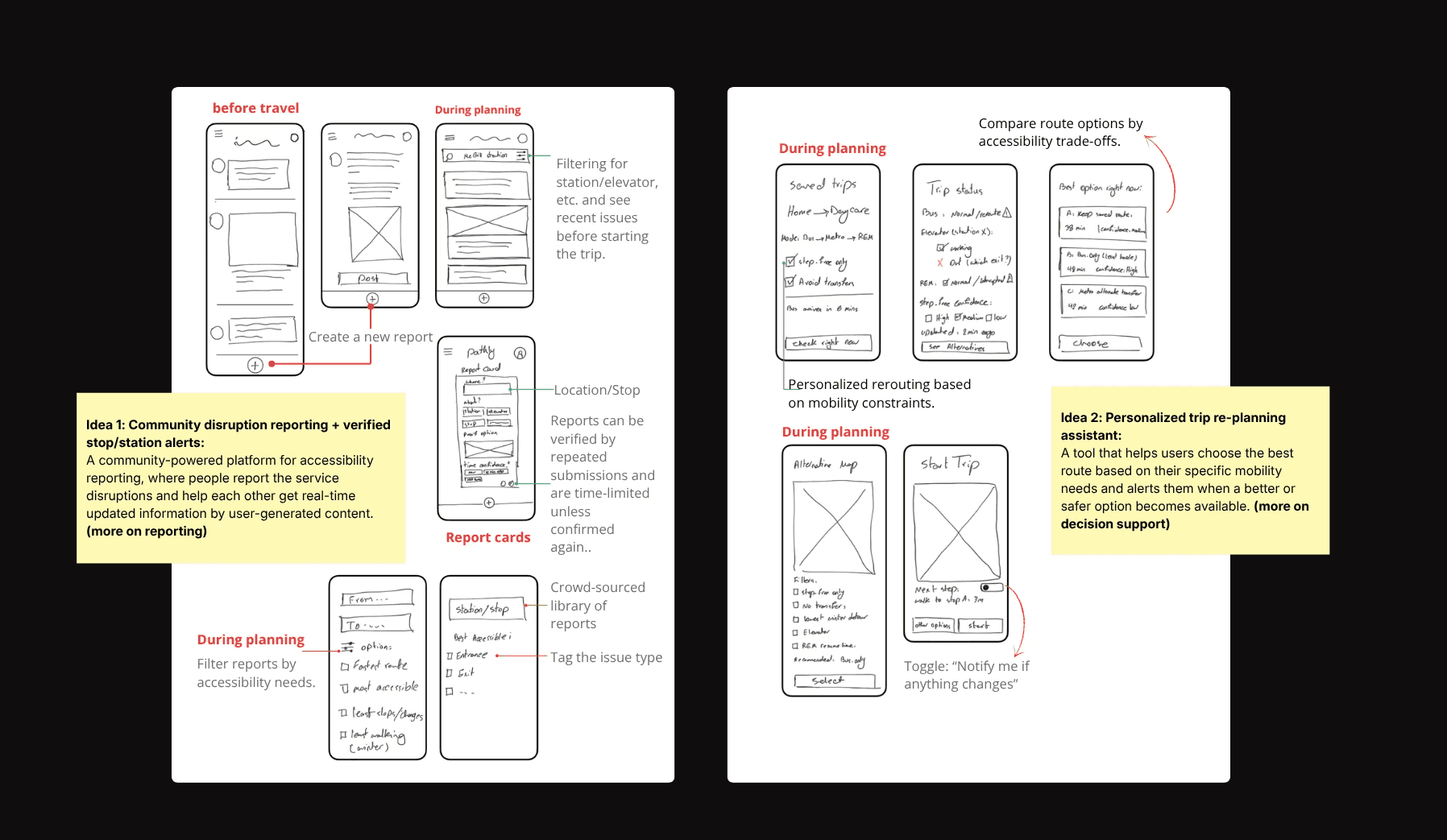
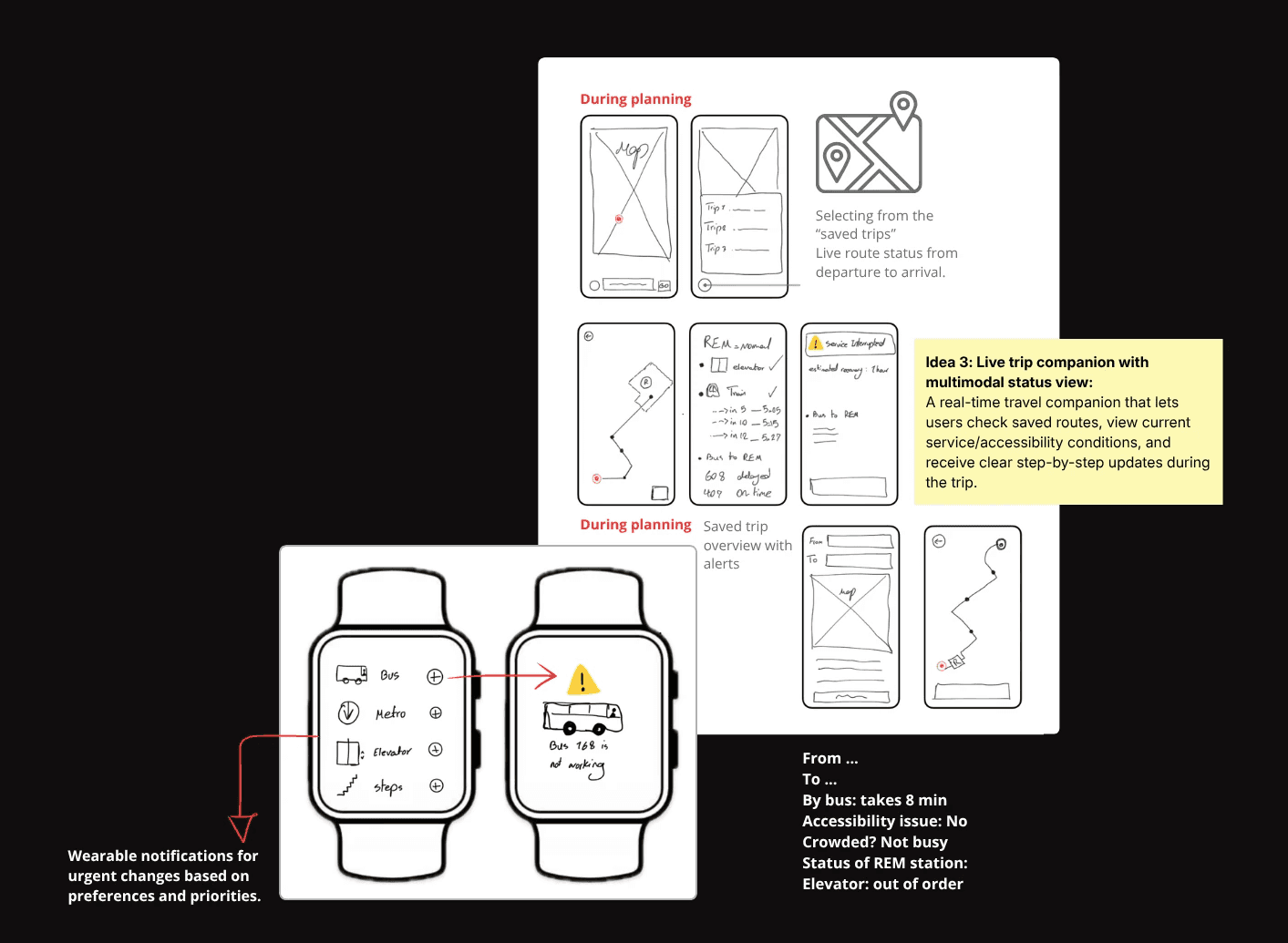
Concept development
Timeline
January - March 2026
Project overview
Making Montréal transit more predictable when accessibility breaks down.
Montréal’s transit network spans multiple services—STM, REM, exo—with fragmented status and accessibility information.
This project addresses the information gap, not the infrastructure.
Pathly brings critical accessibility information into one place, helping riders know whether their route is usable, understand disruptions, and confidently choose what to do next.
This product introduces three core moves:
Mobility as a temporary state, not a profile setting
riders adjust their condition per trip rather than declaring an identity
A manageability ranking
built from effort, transfer complexity, reliability, and live accessibility status
A low-attention alert layer
on watch and haptics, designed for riders whose hands are full
The problem
Fragmented information makes accessible transit unpredictable.
For riders who depend on step-free access, an elevator outage can make an entire station unusable. Yet there is no single source that tells riders whether their planned route is actually accessible right now.
Information is fragmented across multiple platforms, often delayed or incomplete, forcing riders to replan under pressure—leading to missed connections and stress.
This problem is broken into two contexts:
Infrastructure failures: broken elevators, construction, and winter conditions are outside the scope.
Information failures: fragmented, delayed, and unactionable are the design opportunity.

The design opportunity isn't fixing elevators, it's making their status actionable before the rider commits to a route.
Reframing the problem
From fixed accessibility to situational mobility
No single platform tells riders with situational mobility needs whether their route is usable today.
Most transit apps ask:
“Is this route accessible?”
Pathly asks:
“Is this route manageable for me today?”
Who is this for
The same broken elevator stops a wheelchair and a stroller.
Research surfaced three kinds of mobility need, and the infrastructure doesn't distinguish between them:
Permanent: wheelchair and cane users, riders for whom step-free access is always required
Temporary: recovery from injury or surgery, lasting weeks or months
Situational: a stroller, heavy luggage, low energy, a bad day
Most transit tools are built for the first group and ignore the other two. Pathly treats all three as the same design problem because a broken elevator is the same barrier regardless of why a rider can't take the stairs.
Primary
Riders who depend on elevators: wheelchair users, people recovering from injury, older adults, parents with strollers, and anyone carrying heavy loads.
Secondary
Every transit rider.
Disruption information helps everyone; it's just non-negotiable for the primary group.
Solution

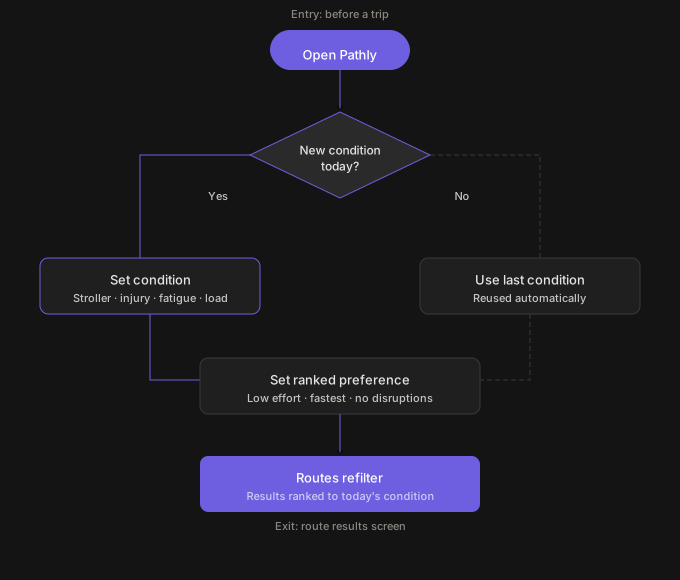
Mobility resets every trip
Riders set their current condition—stroller, injury, fatigue, heavy load—so recommendations respond to what they can manage today, not a fixed profile.
Effort ranked above speed
Effort, transfers, reliability, and live accessibility status are shown together, so a rider picks the route that feels realistic, not just the fastest one.


Reports expire unless confirmed
Community reports fade without confirmation from other riders — useful when current, invisible when stale.
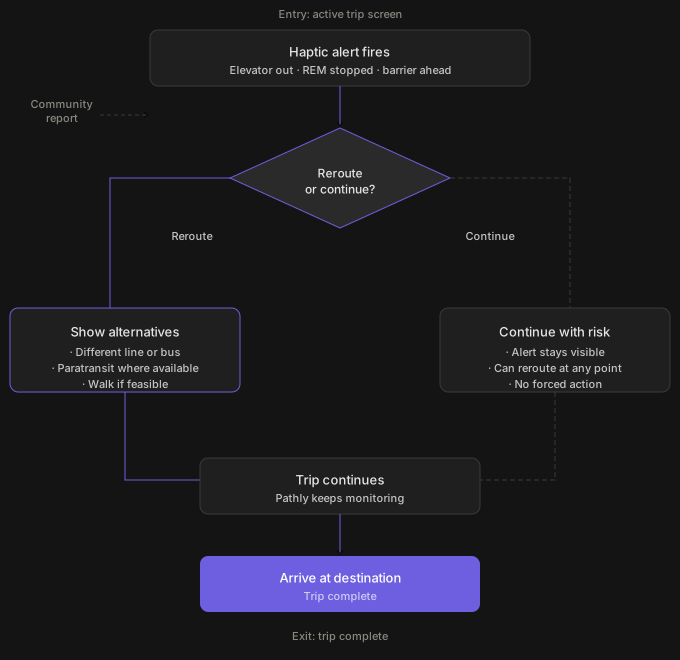
Alerts that don't need a free hand
Watch and haptic alerts surface critical changes for riders who can't check a phone mid-trip.


System Constraints
Pathly can't fix the infrastructure. It can only work with what the data allows.
Five data formats, five update schedules. None designed to talk to each other. Pathly sits on top of this fragmentation; it doesn't solve it. Three constraints shaped every design decision:
Data availability.
STM and exo publish structured GTFS feeds. REM publishes elevator status via social media, not an API. Community reports fill the gap — but they're unverified by default, which is why the confirmation and expiry mechanic exists.
Latency.
Elevator outage data can lag by minutes. Pathly surfaces the last known status with a timestamp — never presenting stale data as current without flagging it.
Scope boundary.
Pathly can consolidate and contextualize. It cannot fix a broken elevator, predict an unannounced closure, or guarantee a route will remain accessible after the rider commits to it. The design makes this boundary visible rather than hiding it behind false confidence.

Research
Filtering came last. It needed to come first.
Secondary research established the problem: five agencies, fragmented data, no unified status feed. But it left one assumption untested — that standard transit filters would be enough to help riders with situational needs make confident decisions.
To test this, I ran semi-moderated task flow tests on a low-fidelity prototype. Five participants worked through five key frames: comparing route options after a disruption, applying filters, reviewing a user-reported alert, rerouting after a service change, and submitting a report.
Three things broke consistently:
Insight 1:
Route cards need manageability criteria, not just time
Insight 2:
Filters are too broad for situational needs
Insight 3:
Community reports need trust signals to be actionable
Journey map
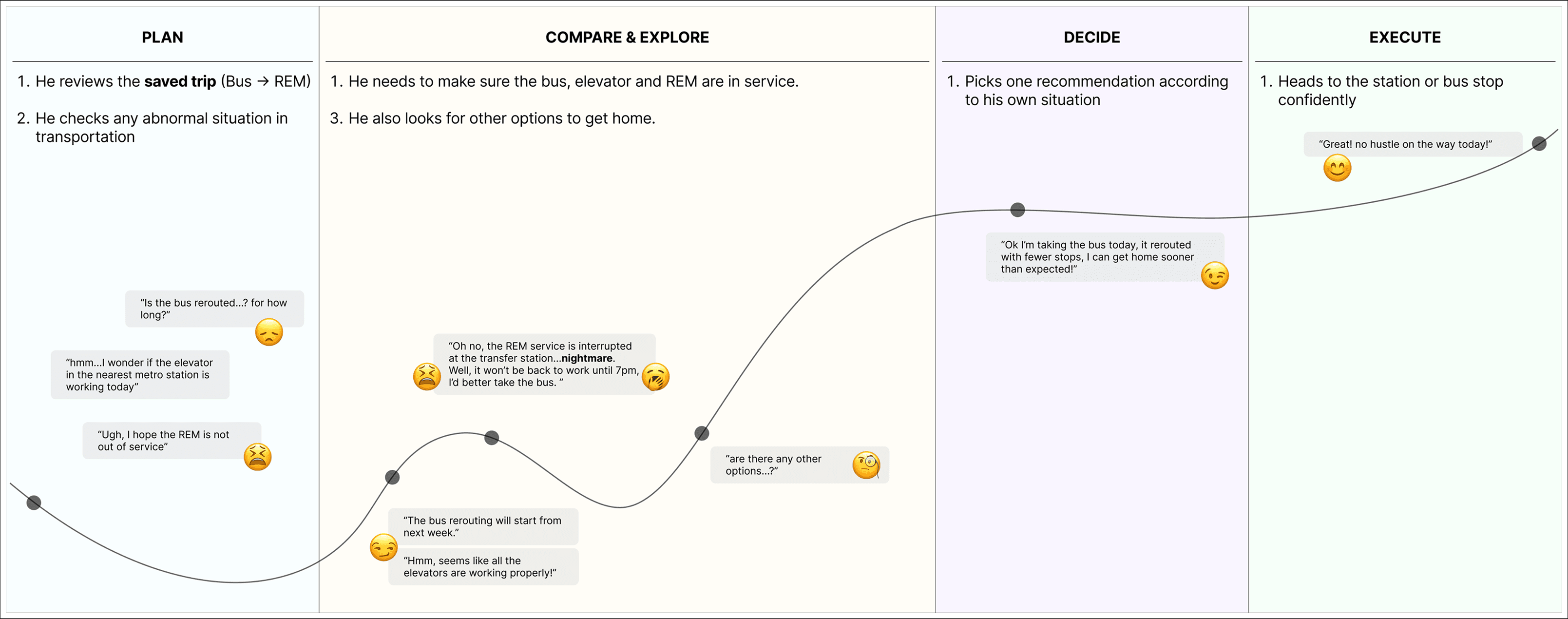
Before testing, I mapped the trip from planning to arrival to identify where uncertainty peaks. This shaped what the prototype tested.
Design Strategy
Mobility is temporary, not permanent.
ruled out a fixed accessibility profile.
ruled out filtering inaccessible routes. The least-bad option is always shown with a warning.
ruled out phone-only alerts. The information has to reach the rider, not wait for them.
Community reports are the only real-time REM source — but unverified reports create false confidence. Confirm and expire was the resolution.
Filter-based personalization. Too generic for situational needs. The mobility profile replaced it entirely.
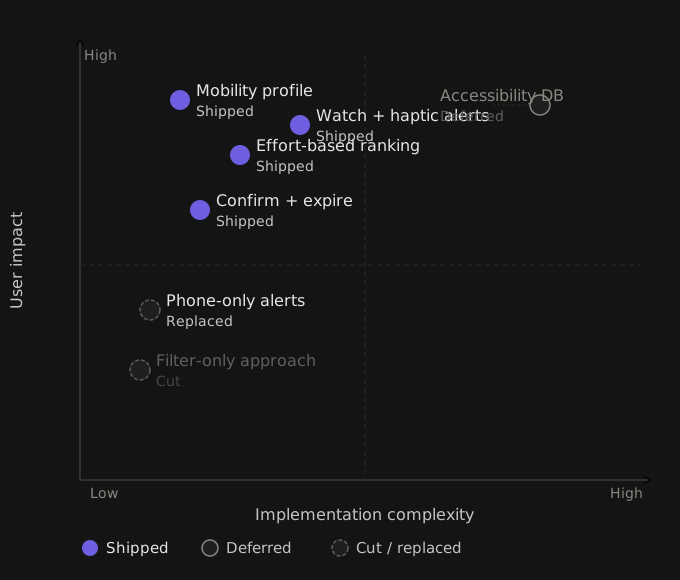
Filter-only sat in the low-impact quadrant after testing — easy to build, not worth building.
UI
Every screen carries the same question: is this manageable for me today?


Prototype
A connected experience for planning, adjusting, and traveling with confidence
From route planner to trip companion
V1 ended when a route was selected. Riders needed support after committing — when conditions change mid-trip.
From submitted reports to verified updates
Early reports were single and unverified. Participants didn't trust them. Confirmation counts and expiry timestamps were added.
From phone-only to low-attention layer
Alerts lived on screen only. Riders pushing strollers or navigating crowds couldn't check their phone when it mattered most. Watch and haptic support added.

Reflection
What I'd do differently, and what this changed.
What I learned
This project reframed how I think about accessibility, not as a fixed label but as a condition that changes trip to trip. The biggest shift was moving from "how do we show accessible routes?" to "how do we help riders decide what's manageable today?" That question changed every downstream design decision.
What's still open
The final prototype hasn't been tested with actual riders with temporary mobility constraints, the people this was designed for.
Haptic patterns for different alert types were explored but not differentiated; urgency, rerouting, and disruption currently feel the same.
The line between official transit data and community reports needs to be visually clearer; trust depends on it.
If I had another month:
I'd run one structured test session with 5 riders—at least two with temporary injuries—and focus entirely on the mid-trip alert flow. That's the moment the product either earns trust or loses it.