UX Research
Chrono is Montreal’s public transit app, used daily by riders to plan trips, reload OPUS cards, and navigate the city.
I conducted a real-world usability evaluation to assess how effectively users could complete critical tasks and where breakdowns occurred in task flow, navigation clarity, and system feedback.
Context
Academic usability research project · Real-world product
Methods
Moderated usability testing
Task-based evaluation
Qualitative synthesis
Timeline
4-week end-to-end research sprint · 2025
Role
UX Researcher (Study design, moderation, synthesis)
Critical usability issues identified during task-based evaluation
Tools & Documentation
Airtable (research planning & synthesis), Google Forms (participant intake & post-task surveys), Figma/FigJam (insight documentation and recommendations). Sessions were audio-recorded on Android devices to capture real-world interactions for analysis.
6 participants · 3 core tasks · Moderated, in-person testing
Deliverables
Usability test plan & task scripts
Heuristic evaluation summary
Session recordings & structured observation notes
Affinity mapping & synthesized findings
Design recommendations report
Presentation deck summarizing key insights.
Research Focus
To focus the usability evaluation, the study targeted three high-frequency, high-impact user tasks within the Chrono app. These tasks represent critical moments where usability issues can directly affect user confidence, task success, and continued app adoption.
• Trip planning (A → B navigation)
• OPUS card reloading
• Managing favorite locations
These tasks were selected because failure at any point creates immediate friction during time-sensitive transit decisions.
Task prioritization using a usability risk–impact framework
To prioritize what to test within limited time, the Nielsen Norman Group’s usability testing prioritization matrix was adopted. Tasks were evaluated across three dimensions: user impact, business impact, and risk, which allowed for focusing on areas where usability breakdowns would have the greatest consequences.
Frequent user complaints and comparisons with competitor apps such as Google Maps and Transit further informed task selection.
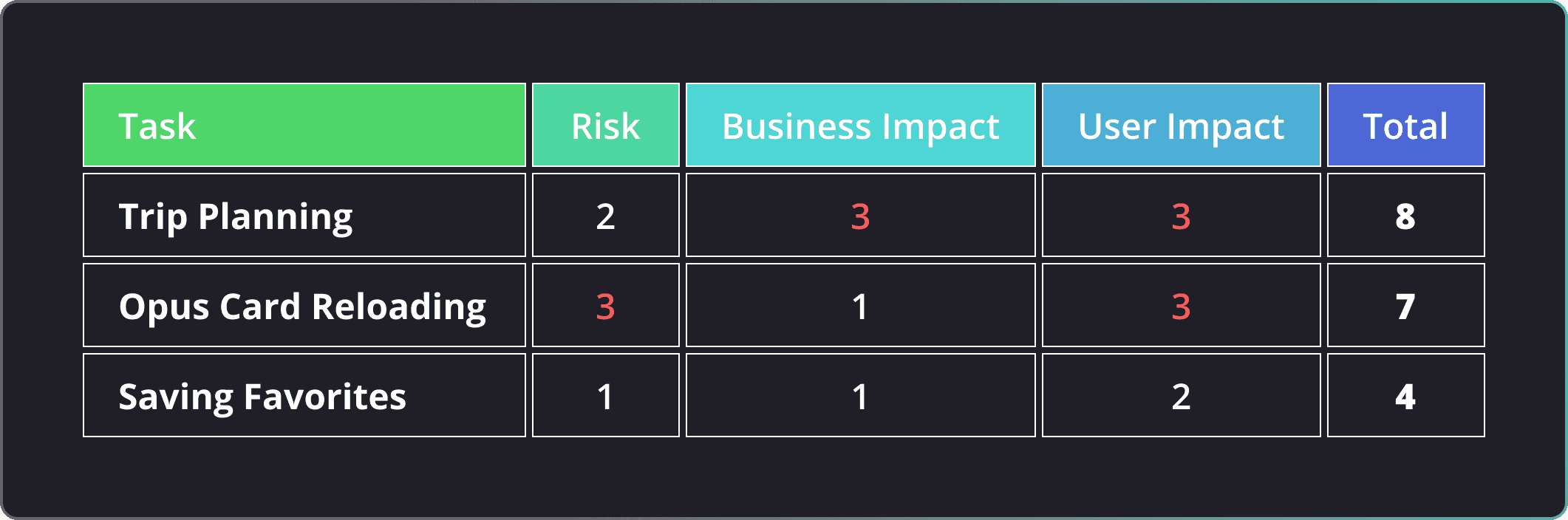
Task prioritization framework adapted from Nielsen Norman Group (2021).
1= Low
2= Medium
3= High
Tasks with the highest combined impact scores were selected for usability testing, ensuring the study focused on issues most likely to affect both user experience and product outcomes.
Tasks and questionnaires were purpose-built to target high-risk workflows, with each measure mapped to a specific research question and potential design decision.
The study combined task-based testing with think-aloud protocols and post-task questioning to understand not only what users did, but why breakdowns occurred.
Participants: 6 (in-person, moderated)
Approach: Task-based + think-aloud
Measures: Task success, errors, behavioral markers, direct quotes
Research Design Diagram
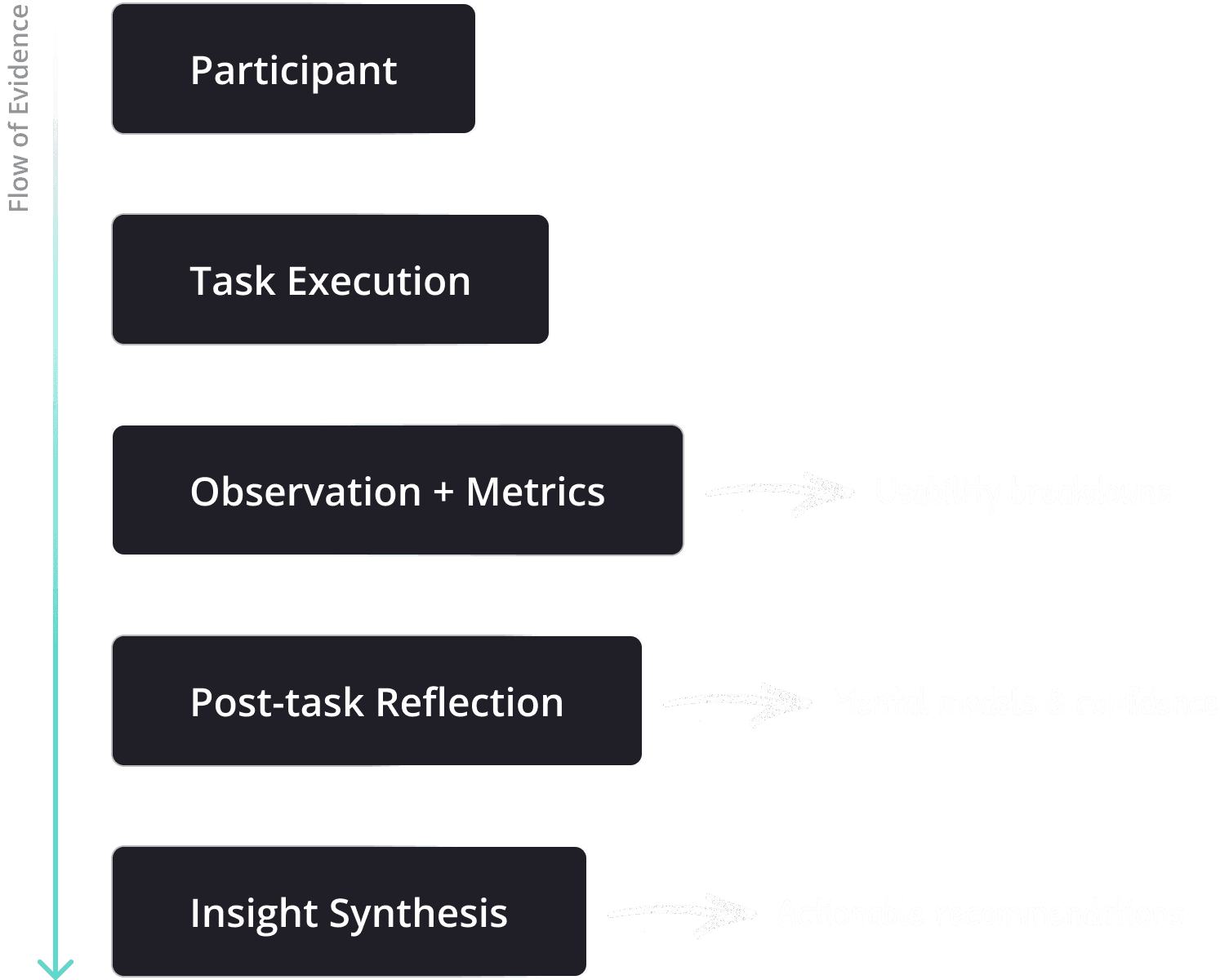
This structure ensured that every data point collected could be directly traced to a usability insight or design recommendation.
Key Findings from Usability Testing
Tasks were perceived as easy, yet behavioral data revealed high error rates.
Quantitative Summary
Behavioral performance vs. perception
INSIGHT #1
50% error rate (9 of 18 task attempts had at least one error)
INSIGHT #2
Up to 4× longer task completion times compared to benchmark
INSIGHT #3
Users required more steps than expected to complete tasks
Although participants rated tasks as easy and the overall app experience as acceptable, behavioral data revealed frequent errors, longer completion times, and inefficient task paths. Many users attributed mistakes to themselves rather than the interface, masking underlying usability issues.
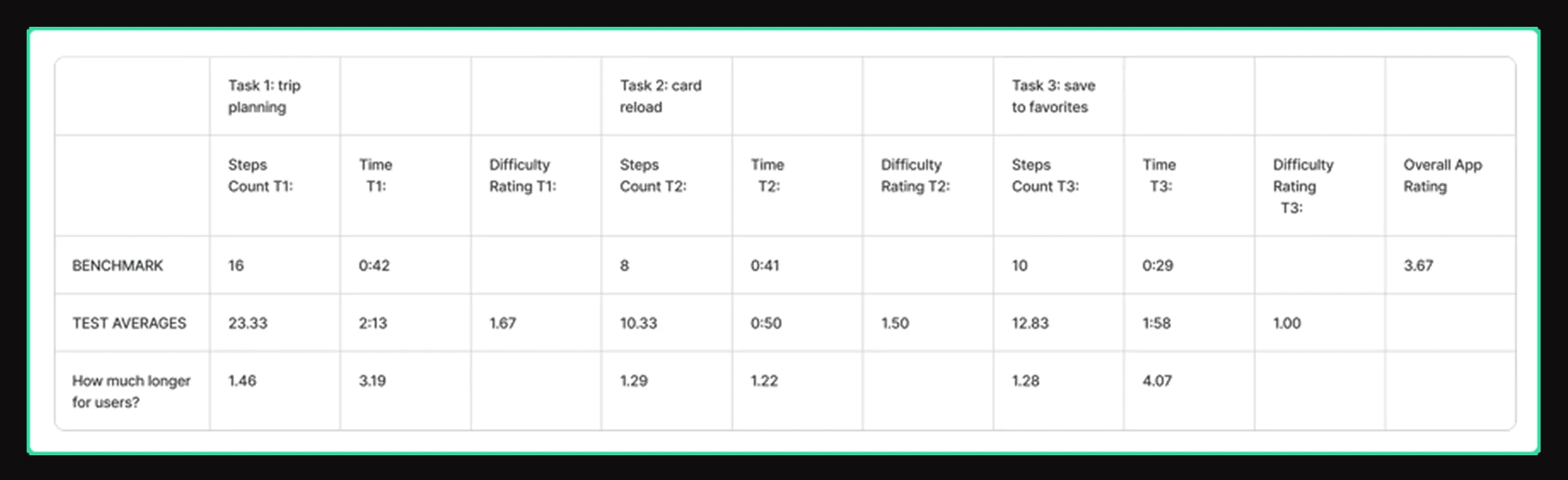
Comparison of benchmark performance versus observed task performance across the three tested tasks.
The Findings -QUALITATIVE
Despite observable struggles during task execution, users frequently attributed errors to themselves rather than to the interface.
- Participant, first-time Chrono user
This behavior had three key implications:
Lack of system feedback prevented users from identifying errors
In-app guidance was insufficient during moments of uncertainty
Iconography and labels failed to communicate system state clearly
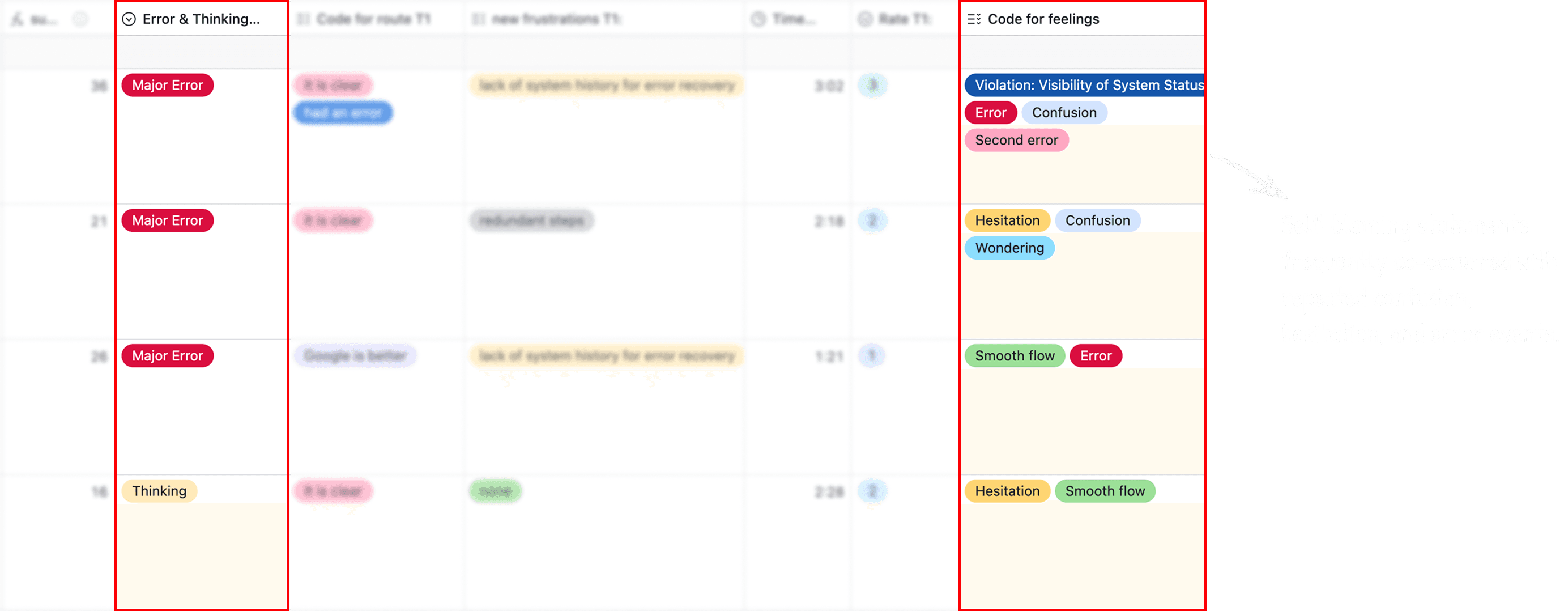
This pattern suggests that usability issues in Chrono are not always surfaced through user feedback or ratings, as users often internalize friction instead of reporting it.
Key Findings
To understand why users blamed themselves rather than the app, we analyzed where confusion and errors occurred within specific task flows.
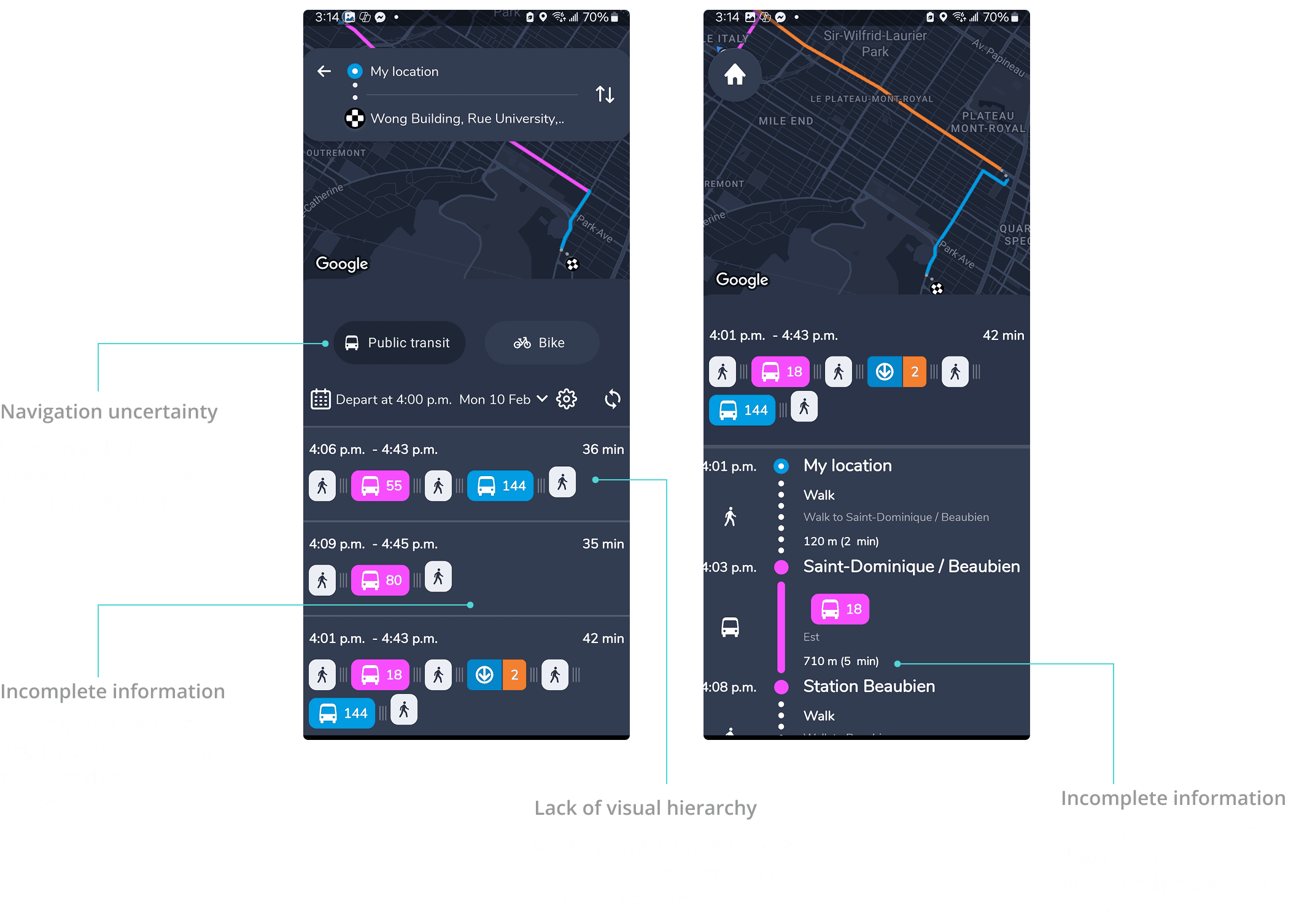
Task 1: Trip Planning
Behavioral performance vs. perception
Observed behavior
67% of participants exhibited observable confusion
Only 2 of 6 participants completed the task without errors
Breakdown
Back navigation was not discoverable
Swipe gestures lacked affordance
Users hesitated, retraced steps, or abandoned paths
- Participant, first-time Chrono user
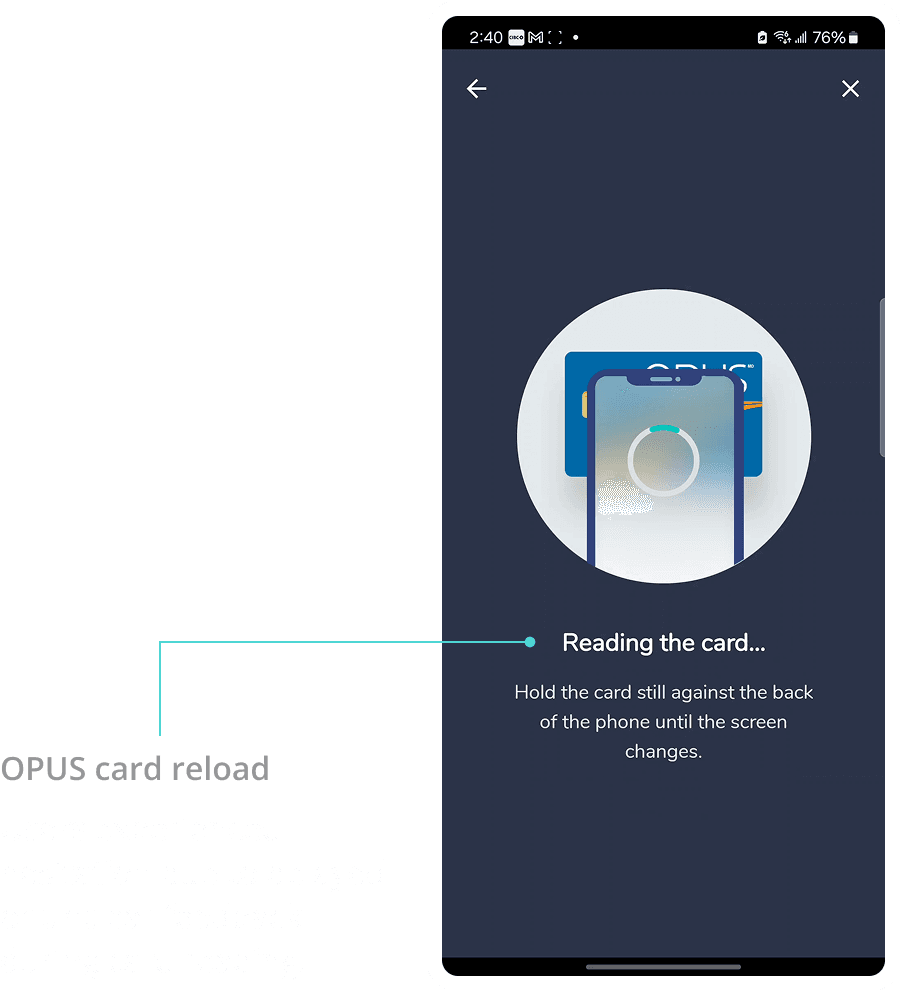
Task 2: OPUS Card Reloading
Behavioral performance vs. perception
Observed behavior
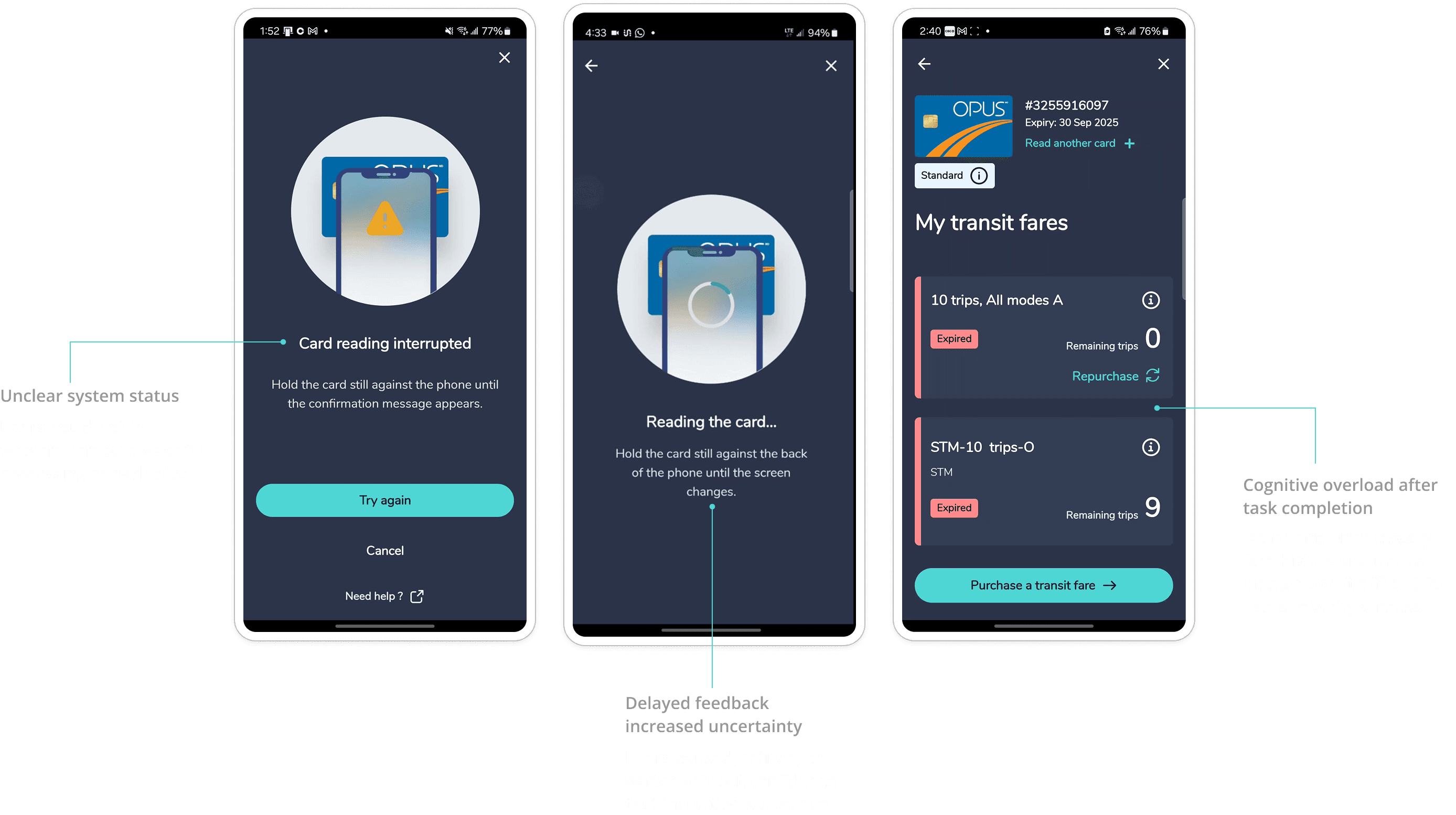
Users hesitated during card reading due to unclear system status
Participants waited, retried, or abandoned the flow without confirmation
Several users verbalized uncertainty about whether the action succeeded
Breakdown
Card reading feedback was delayed or ambiguous
No clear success confirmation after reading
Errors sometimes appeared after card reading, breaking user trust
—Participant, regular transit user
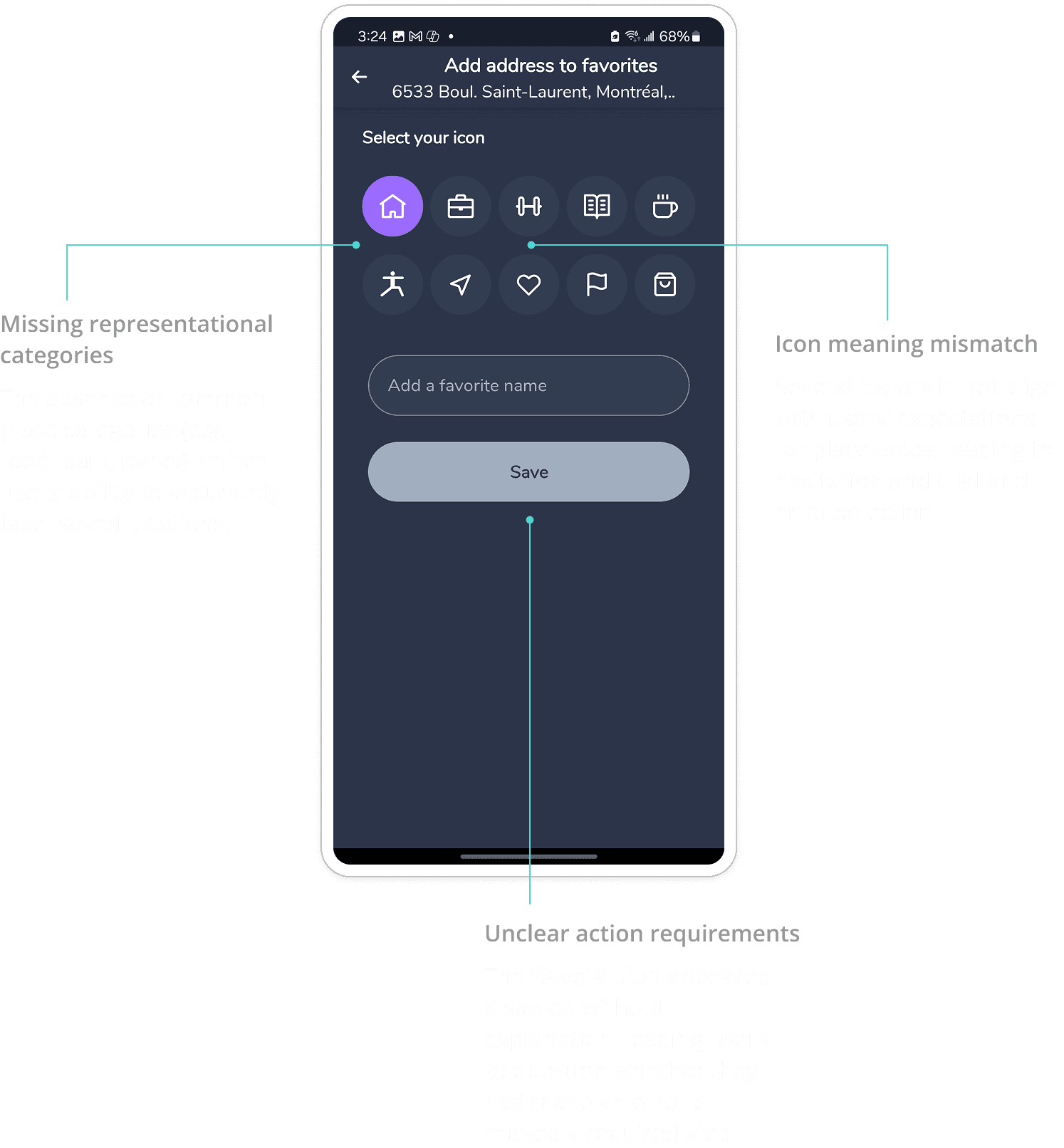
Task 3: Saving to Favorites
Behavioral performance vs. perception
Observed behavior
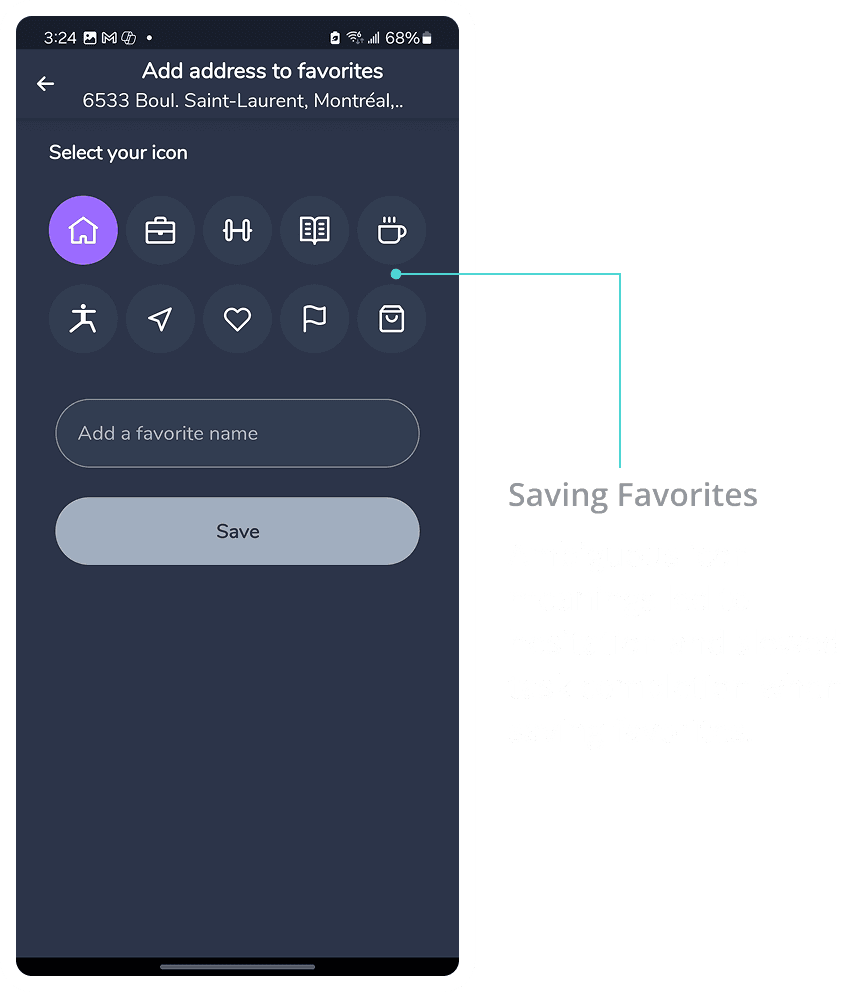
Users hesitated before selecting an icon, often scanning multiple options
Several participants verbalized uncertainty about icon meanings
Some users attempted to save without understanding why the action was unavailable
Icon selection felt exploratory rather than confident or intentional
Breakdown
Iconography did not align with users’ mental models for common place types.
Visual affordances did not clearly indicate required inputs
Redundant and unused icons increased cognitive load
Missing and ambiguous category icons limited users’ ability to accurately represent real locations
Design Implications & Recommendations
Trip Planning
1. Make system state and navigation reversible at all times
Why
Users frequently hesitated or restarted trip planning due to fear of losing progress. The absence of a visible back action and autosave led users to blame themselves rather than explore confidently.
Design actions
Introduce a persistent, visible “Back” action in trip detail screens
Autosave trip planning inputs to preserve user progress across navigation
Allow safe recovery from errors without resetting the task
2. Surface route details earlier to support decision-making
Why
Users struggled to compare routes due to missing or delayed information (e.g., walking time, number of stops), increasing cognitive load and hesitation.
Design actions
Display key route attributes upfront (walking distance, number of transfers, total steps)
Establish a clear visual hierarchy to differentiate primary vs. secondary route details
Reduce reliance on progressive disclosure for essential comparison data
Design principle:
When users are navigating time-sensitive tasks, interfaces must prioritize clarity, reversibility, and state visibility over minimalism.

Recommendations
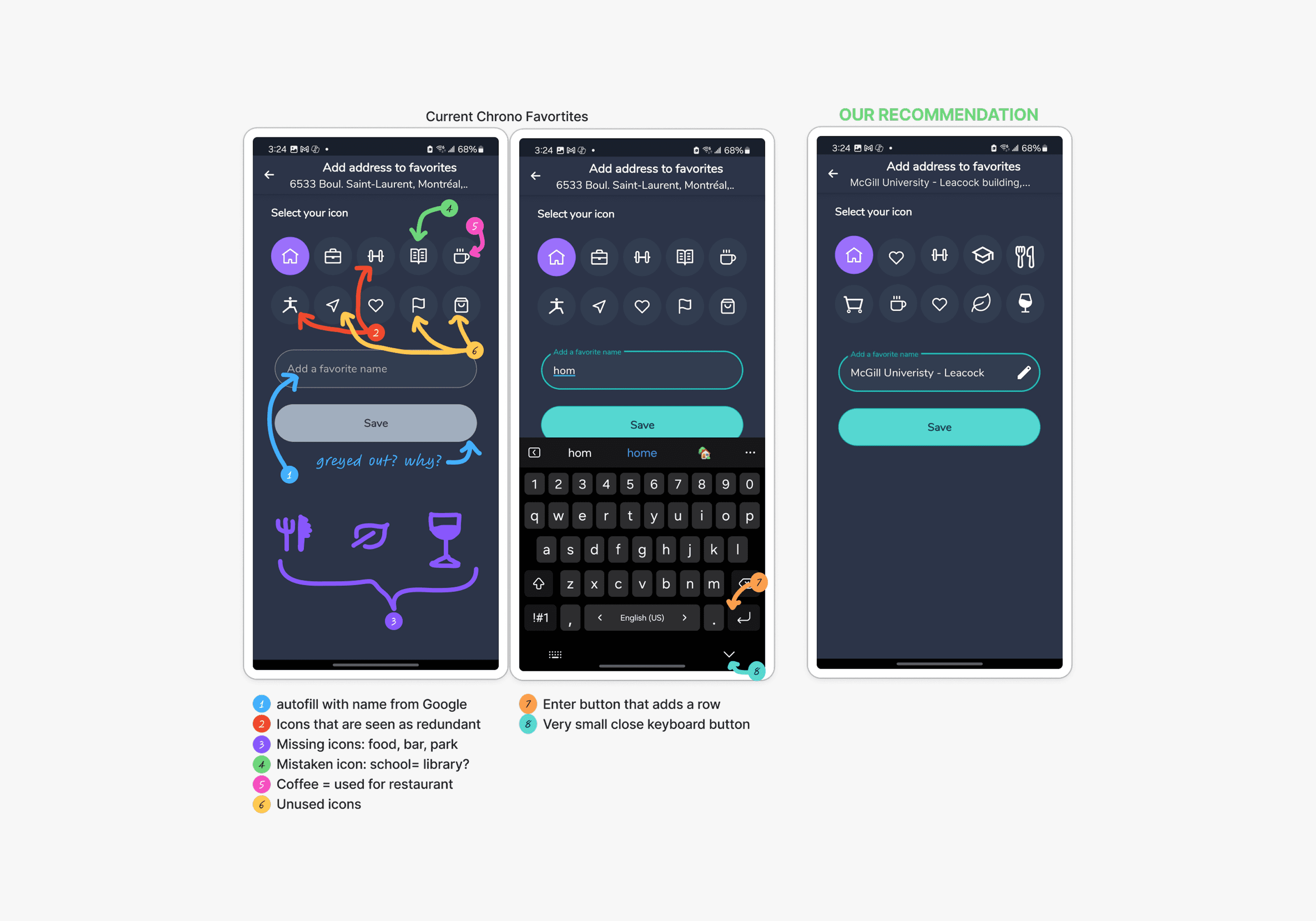
Improving the Favorites Feature
Recommendation:
Simplify and clarify the icon set using familiar, intuitive symbols (e.g., leaf for parks, fork for restaurants).
Make naming optional by auto-filling location names.
Fix the confusing "Enter" key behavior to align with user expectations.
These changes reduce cognitive load and make the Favorites feature quicker and more user-friendly.
Recommendations
Card Loading
The reload errors need to be a priority for fixing. More testing and investigation into the card reader
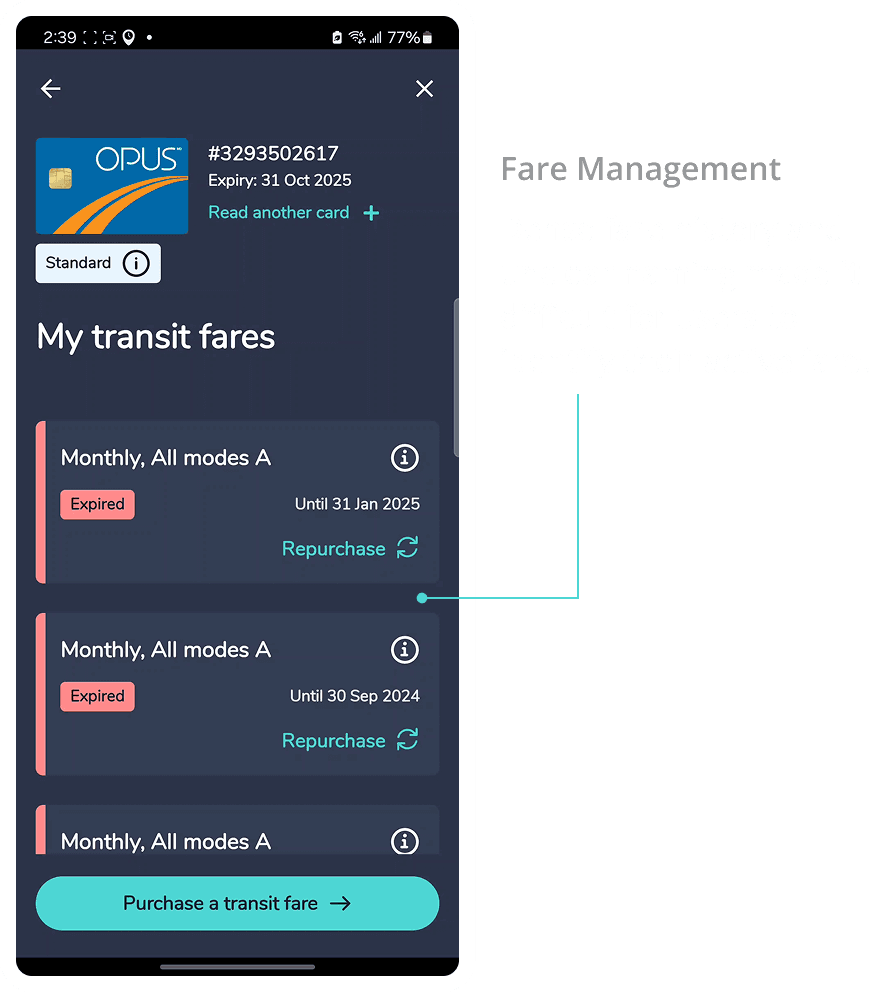
Simplify fare history UI; separate active vs expired fares.
Improve hierarchy of information for purchase

Challenges & Future Work
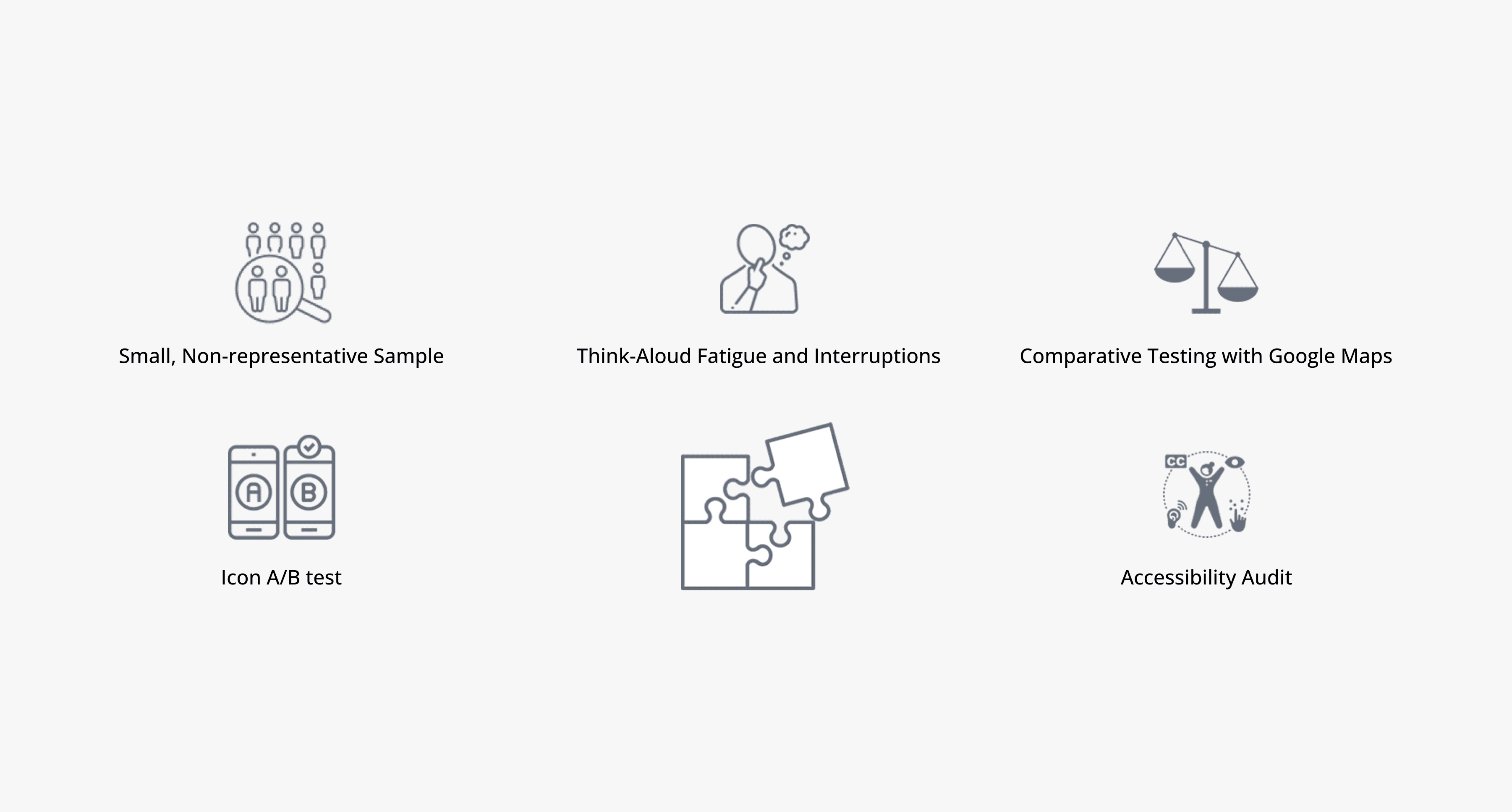
Future Research Opportunities:
Running comparative testing with Google Maps to identify must-have features.
Conducting an accessibility audit to ensure usability for users with diverse needs.
A/B testing redesigned icon sets for better recognition and preference.
Gathering long-term feedback by tracking user behavior post-onboarding.
Reflections
I gained hands-on experience planning and moderating usability tests in real-world settings.
I realized how easily users blame themselves for poor UX, it reminded me the importance of clear, intuitive design.
I observed that think-aloud method affects user behavior and task timing; I would try remote or repeat-task methods in future studies.
I noted the limitations of a small, non-diverse participant group, future tests should include long-term and older users for deeper insights.
This project strengthened my confidence in research and deepened my empathy for users navigating unclear interfaces.